What’s new at Zystrix? Read on…
February 16, 2026
Tips and Tricks for
Recording Massive
Metal Guitar
(part one of two)
In the last episode we went over part two of the
intermediate to advanced guitarist
ways to invent or create metal riffs
(click here for a refresher). This time
we’re going to go over
Tips and Tricks for Recording
Massive Metal Guitar. We need a
bigger sound. So sit back and relax.
Welcome to Zystrix, the heartbeat of
the universe. Where creativity and
free-thinking have more value than conformity.
Background
Artwork
The colorful artwork that
surrounds the edges of this
website is
invisible to
many cell
phone users. It’s included here
(with others) for
your enjoyment.
Multiple copies are tiled together for
a cohesive and seamless
background seen all
around this page.
Enjoy.
Sponsors wanted it.
Journalists debated it.
Opponents invoked it.
Tips and Tricks
For Recording
Massive Metal
Guitar
Introduction
I am going at this assuming you already have
a basic understanding of recording, you know
what a DAW (digital audio workstation) is, you’ve
purchased your chosen DAW (Reaper is excellent
for the price), you know the basics of your DAW,
the necessary buffer size for your CPU, input gain
settings, sample rate, etc. The higher the
computer CPU power you have the better off you
are going to be for recording. Hopefully you
understand how to record mono or stereo guitar
tracks, bass tracks, synth tacks (if needed), and
can record and/or splice MIDI data for your drums.
Head phones are nice for stereo placement but
they are not an end all solution -- air is the best
mixer. A pair of portable speakers with a wired
input (not Bluetooth) is great as is a boombox
(jambox) for a way to hear what you’re doing. If
you do not understand all of this simply follow
along for future reference.
The Metal Gear
Rabbit Hole
I’m a big fan of using my stage
gear as my recording gear. I
hate buying gear twice.
If a piece of gear can do double or triple
duty that’s excellent, at least to me. I
also try to use free NAM modeler plugins.
Use them if you use the Valeton GP5 or the GP-
50 pedal (these need conversion) or the NUX
Amp Acadamy Stomp, or the Blackstar Beam
ain’t bad either. And the Valeton and others work
for bass, guitar, synth, etc. The plugins for these
pedals are the free open source NAM plugins or
files for your guitar tones, although you can also
use the free NAM plugin software in your DAW if
you use Windows 10. There’s no reason (unless
you don’t care) to purchase NAM plugins because
there are so many that are free. Check out the
website called TONE3000 (formerly ToneHunt).
There are thousands of profiles that range from
superior to horrible, but a few are noteworthy. The
Mesa Boogie JP-2C by Emil Rohbe / Paul
Jacovino is excellent. The Revv Generator 120
MK III by noamp is another great choice. Also
give a listen to the 6505 (2004, USA) by Arlington
Audio. I also try to use my own drum sounds
(free), or my own reverbs (free), or my own
speaker IRs (free). Even synthesizers. I even
use all free studio effects plugins for my DAW, and
if you need a list of the ones I prefer or I think are
the best check out the free studio plugin issue. I
also use free mastering tools. For a list of great
plugins go to the mastering plugins
issue.
Basic Tips First,
The Easy Stuff
Recitation:
Make sure your guitar is good enough
to play and record without too many issues.
Make sure your intonation is as close as you
can get. Track down and eliminate all buzzes
that shouldn’t be there. I’m a raw type of
guitarist so I prefer some guitar issues. But most
guitarists don’t. Take your guitar to a guitar tech if
you don’t know how to do it yourself. Use fresh
strings that have been worked in so they stay in
tune. Use as many takes as you need to record it
being played correctly. It always sounds
more real.
Tune often
I
never hurts my feelings if you tune
before every take or so. And I
hope you feel the same for me.
It’s better to be in tune in the tuning of
your choice and make a few digital
repairs than it is to notice it later and
have to re-do a track.
Signal Level
If you are recording by yourself then
you’ll need to check your levels. Make
sure your signal is high enough to print a good
track, not so loud it digitally distorts, and not so
low that the signal to noise ratio is annoying. Test
it with a loud chord or a forceful palm mute so
your level is correct for the loudest parts of your
playing. Don’t use a compressor here to cheat the
volume because you are looking for dynamics.
Although I am guilty of using a limiter for level
insurance, it’s generally not a good idea for
conserving dynamics. However, it’s fine to use a
compressor on the guitar after
the tracks are done.
Bare Bones
Record using a bare-bones
setup (for now). By this I mean use the least
amount of computer CPU-taxing plugins as
possible to get the best guitar signal recorded.
Record guitar while playing along
with drums (and bass if you’ve got it)
and also the metronome to help stay
in the groove and help with the feel of
the tune. Your drum module (or drum
tracks), tuner (or one in your pedal
board), amp sim (or external module or pedal and
a clean signal). Add your compressors, reverb,
effects and so on later to conserve
computer CPU use.
Note Definition
Play with definition so your individual
guitar notes pop out of the mix. Avoid
slop – clarity is the keyword here. Use a
hard pick – soft picks have too much give. Try to
practice amplified (or at least an emulation or
modeler) and learn how to control the gain
for clarity.
Clamp Down the Extra Noise
Some guitarists use a way to dampen the
headstock strings behind the nut or under
the wang or whammy bar springs in the
back of the guitar. Many guitarists also
dampen the strings that are not being played while
recording a musical section by physically
muting or taping strings not being
used. Try a sock, some spare
fabric, a hair-tie, a head band, or
a piece of foam rubber. You can
also purchase a professional model
for dampening, but I always like
things home-made. And it’s
cheaper. I don’t like dampening for
myself because, once again, I prefer the raw
sound of the guitar. But many guitarists
use it to make the quiet parts dead silent.
Fair enough. On this topic I agree to
disagree.
Two Tracks per Take
Always record a dry track along
with the external amp or
distorted track. If you make a
mistake simply repair the clean track and re-amp
the external amp sound. Don’t forget to get a
high-to-low impedance box, or a spit signal using
a high-to-low tuner like the TC Electronic
Polytune. If you are using the internal computer
sounds from a plugin then recording two tracks
simultaneously isn’t necessary. Use the guitar
amp plugin post live signal or on a separate track.
My Compliments
to the Chef --
That’s A Tasty Blend
Use complimentary guitar tones to sum to mono
for a bigger single guitar tone. For instance, a
take-off of the double microphone placement
where one is zeros degrees to the speaker and
one is 45 degrees and they are mixed to mono. A
good choice of two of your favorite complimentary
sounding cab IR’s can also get you there. When
you sum the two signals to mono use your ear for
phasing issues because mono is always phase
correct. When using two different versions
panned hard left and right check the two guitars
for phase issues using a plugin designed for that.
Nobody likes a mosquito sounding guitar.
Quantizing Your
Clean Guitar Signals
Try guitar track quantizing for even more perfect
massive tracks. Use stretch markers in your DAW
on guitar tracks that are not quite perfect but
pretty darn close to on the beat. Nobody’s
perfect, so it might as well be perfect for your
audience. Using this trick can be very time
consuming but extremely helpful. Some say it’s
cheating, but there are other choices: either play
the whole track again, or punch-in to repair small
parts of what you’ve got, or keep practicing the
part(s) and come back later. Repairing the
offending track using stretch markers is often a
great choice if it just needs a little tempo fixing.
Symbiosis
The bass and guitar tones
usually have a symbiotic
relationship and they can
benefit each other. That’s
not to say two different tone types wont mix. Hell,
I’m sure with a clever engineer Lawrence Welk
and Black Sabbath sounds could be mixed
successfully. But they must work together as a
unit so the bass guitar low end works in the guitar
mix, and the guitar doesn’t overshadow the bass
mix. For them to work together a little better
simply notch out the bass frequencies between
230-500 cycles so the guitar has room in the lower
mids. This can be done a few ways. Split the
bass signal in half and make the lower
frequencies a more defined low end grunt, and
use some kind of tube distortion for the upper half.
Another way is similar but the bass is split into
three frequency ranges using the same method
for the lower frequencies and mid-frequencies,
and the top end is distorted to taste to cut through
the band. Yet another way (although not quite as
good) is to simply use an old fashion multi-band
EQ to lower frequencies on the bass in the 230-
500Hz range. It’s possible to make the EQ
settings complimentary.
EQ The Guitar
The Super Fine Tuning
Sometimes the guitar needs an
EQ haircut. If the truth be
known, it always does unless your modeler sound
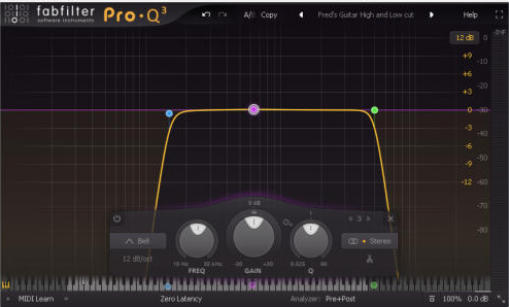
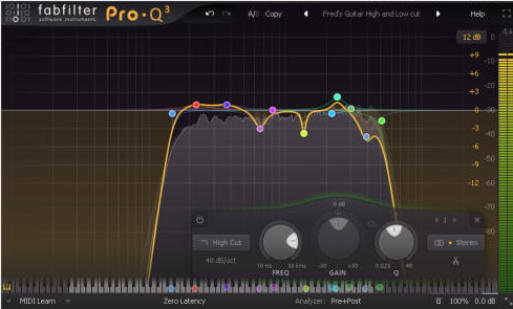
is very refined. To do this, start with a high pass
and low pass EQ to clean up the guitar, or low cut
and high cut. It doesn’t have to be a brick-wall
type filter, but it has to be enough on either end of
the EQ spectrum to tame down the signal. Use
roughly 48dB or so per octave, or a relatively
steep slope, but not quite a brick-wall. When I do
mine it looks sort of like an upside down paper
cup. I usually start my low end roll-off at about
120Hz and my high-end roll-off at about 5KHz, but
use your ears for your likely spots. Many people
start the high-end roll-off a little higher at about
6KHz to 7KHz, so again, use your ears for the
precise point. Your initial EQ curve may look like
this…
Repairing the upper mid-range comes next at
about 700hz to 3KHz. Sweep to find problem
frequencies and notch out the ear fatigue noise
areas. Use a narrow band setting on you EQ and
start your cut at about 2dB. Then at around
400Hz scan to find any low end problems. Cut the
EQ offenders a couple dB to fix the problem but
not so much the guitar sound suffers and loses
body. All these cuts are done with a narrow Q so
frequencies that are pleasant on either side of the
problem area are conserved and not effected. So
as a quick overview…
1. Start with your near brick-wall filtering.
2. Find and fix upper mids problems.
3. Find and fix low mids and any middle mids.
4. Listen for problem resonances and kill them.
5. Voila, you are done.
Your finished guitar EQ job may look something
like this…
Conclusion
Tips and Tricks For Recording
Massive Metal Guitar
We’ve covered the basics of getting a
massive metal guitar sound. And without
using the basics the rest of
the guitar mix doesn’t
matter. I hope this first
of two sections has
given you food for
thought and
consideration, and maybe one of the ideas has
given you a new approach.
Don’t touch that dial…
Stay tuned next time…
In the coming second part of
making recorded metal guitars
sound bigger we’re going to examine
some advanced tips and tricks for making
your riffs sound bigger and beefier.
Routine things like double and
quad tracking, but also multi-tap
delay, track splitting, EQ,
compression, and others. And
we’ll also hear another
solo piano tune from
Dangerous Neighbors
called Vanishing Dream.
Maybe I’ll see you then.
I’ve been told I’m street
smart, but mostly
Sesame Street smart.


Zystrix = a source, shaman, or library disseminating secret or lost knowledge, art, or music.



























ZYSTRIX
POPULAR FREE DOWNLOADS
The Best Free
Synthesizers of 2024
It’s another epic issue, and there’s lots of
FREE downloads here. And the Honorable Mention Synthesizer
List might surprise you. This list is long, so prepare yourself. And
if it seems like too much to take in, I warned you. Click here for
the official list of The Best Free Synthesizers of 2024.
The Best Free
Mastering Plugins
Your DAW (digital audio workstation) will be
so happy. And so will you. Here are the best of the best for
EQ, compression, limiting, tube and tape emulation, reverb,
delay, and honorable mentions. This list is a must have with
lots of downloads. Check out The Best FREE Plugins for
Mastering 2024.
Here’s a free download of almost one and a half hours of original
neo-classical solo piano by Dangerous Neighbors. This full
length album called Piano Top to Bottom consists of 18 original
piano pieces with the final piece in two movements. There is a
bonus track making 20 files total. This download comes in three
format options: the first option is a single file MP3 containing all
the tunes in one chunk similar to tape recordings. The
second download option is a folder with all of the separate
MP3 piano pieces named and arranged in album order
similar to a CD or MP3 player. The third download option is similar
to videos found on “ZooTube” with the names and times on the
screen. There is also a fourth surprise version made only for
“ZooTube” and it is edited down to less than 15 minutes long
because of their telephone number required rule. Basically it just
guides the listener here.
To download any or all of these options simply click here. Enjoy.
Free Guitar Cabinet
Impulse Responses
Introducing
the
next
generation
in
guitar
cabinet
impulse
responses.
Try
the
new
Djammincabs
Maxxx
4x12.
All
of
these
cab
IR
files
are
based
on
old,
new,
and
boutique
4x12
cab
curves.
All
are
recorded
in
beautiful
24-bit
48K
mono
and
will
work
on
most
free
and
paid
digital
convolvers.
Hear
the
guitar
IR
breathe
fire
with
pure
attitude.
Don’t
be
suckered
in
with
high-dollar
sales
pitches,
there
ain’t
no
guitar
IR
downloads
better
than
these.
Choose
from
many
cab
sound
recording
styles:
cone,
edge,
angled,
arm
away,
inside
cab,
back
of
cab,
or
back
of
room.
Djammincabs
is
the
world
leader
in
guitar
cab
IR
invention
--
no
other
guitar
IR
company
can
imitate
these.
Djammincabs
Maxxx
4x12
makes
it
easier
for
you
to
design
your
own
personalized
sound
--
even
your
own
Metal
IR
pack.
If
you
can’t
find
a
cabinet
or
combination
you
like
here,
then
you
don’t
like
4x12
cabinets.
This
guitar
IR
download
also
includes
a
Tactical
Munitions
Manual
with
suggested
uses
and
detailed
cab
combinations.
This
is the best free guitar impulse download available anywhere.
Djammincabs Maxxx 4x12
“Murder Your Competition.”
I feel brave. I want to try them now. Here’s my email...
Djammincabs for Guitar
Free Guitar Impulse Responses
This is the original Djammincabs guitar cabinet impulse response
collection that started it all.
Click here to download
over 200 Free Guitar Cabinet Impulse Responses.
Djammincabs for Bass Guitar
Download Free Bass Impulse Responses
Click here to download
over 200 Free Bass Guitar Cabinet Impulse Responses.
Best Free Guitar Impulses.
The Top 11 Best Free
Guitar and Bass
Cabinet Impulse Responses for
2022
(in alphabetical order…)
Find, download, and test the best
free guitar cabinet impulse responses for 2022.
FREE BASS LOOPS SAMPLES
DOWNLOAD
ROYALTY FREE BASS LOOP SAMPLES
FREE BASS LOOPS
Over 200 samples are included in the
collection
Download the complete collection of 24-bit bass loops here.
NOTE: This download size is approximately 369 Megs.
Free Pendulate
Synthesizer Presets
Original Newfangled Audio Pendulate
synth patches/presets
Click here to download over 240
Free Pendulate Synth Presets (patches)
Synapse Audio
Dune Synthesizer
Download Over 200 Free
Synapse Audio
Dune 2 and Dune 3
Synthesizer Patches and Presets
Click here to download over 200 FREE Synapse Audio
Dune 2 or Dune 3 synthesizer patches or presets.
NOTE: This synth patch download is slightly over 1 Meg in size.
Free Reverb
Impulse
Responses
This is our
most popular
download page.
Choose from hundreds available in
48K 24 bit WAV format
including many new original reverbs.
CabSpace
Over 400 Guitar Isolation Booth Reverbs
Download over 400 Free Zystrix Original Reverb Impulse Responses,
and over 200 Free Zystrix Original BONUS Reverb Impulse
Responses.
Download all the Alesis MIDIVerb 4 reverb impulse responses.
Download all the Lexicon MPX-1 reverb impulse responses.
Download all the Alesis Wedge reverb impulse responses.
Download over 50 Reverb Relics from the past including oil cans.
Click here to download free reverb impulse responses.
Free Drum Samples
Only Available from
Zystrix
Free Gong Samples and Sounds
Free Snare Drum Samples and Sounds
Free Bass Drum Samples and Sounds
Free Oriental Cymbal Samples and Sounds
Free Oriental Bells Samples and Sounds
The Ultimate Original Drum Sounds List
Download over 2000 original slammin’ rock bass drums.
Download original Gongs, Cymbals, Broken Cymbals, and Bells.
Download Over 200 Free Original Bass Drum Sounds and Samples.
Download over 200 Original Free snare drum sounds.
Click here to download Drum Kit Sounds.
Dangerous Neighbors
The SW Michigan
Rock Band Power Trio.
Free Rockin’ Music Downloads
Download
tunes
from
the
80s
to
today.
Use
the
special
codes
on
the
Embalmed
for
Life
page
(see
the
DOWNLOAD
FREE
AUDIO
BOOKS
link
below)
and
get
free
downloads
for
the
complete
album and the free horror audio book
The Fluid - Embalmed for Life.
Click here to download various music from
the rock band Dangerous Neighbors.
Download Free Synth Samples for
Intros, Interludes, and Endings
Listen to example #01 by clicking here (MP3 Sample)
Download FREE professional quality stereo sample packs that
slowly evolve over time. All samples are in 48K 24 bit WAV
format and are about 20 seconds long or more. If you like
suspense, psycho, outer space, or terror then this collection is for
you. These range from paranoia to sci-fi, cinematic gore to
strange industrial horror, and creepy creatures to insane
laboratories.
Click here to download all the
synth Intros, Interludes, and Endings.
DOWNLOAD FREE
AUDIO BOOKS
The Fluid, Embalmed for Life
There are Free Audio Book codes for Audible downloads (must sign up).
There are also free sample downloads of the book reading.
There are free downloads of music samples.
There is a free “Look Inside” download of the paperback.
There is a free glossary of the largest list of mortuary slang in the world.
The Free Dangerous Neighbors Album The Fluid, Embalmed for Life
comes included as part of the audio book and parts are available here as a
free download.
The paperback book is available for
sale at Amazon dot com. I have no
control over these sales; because of the
Amazon agreement I cannot offer
complete paperback or complete audio
books here. And for some reason most
book sales go to Japan. Who would
have thunk it?
Click here for free audio books,
book reading samples, music samples, etc.
Take me back to the top of the page.
Zystrix Privacy Policy
THE
FINE
PRINT:
Zystrix
is
a
world
leader
in
personal
privacy
and
we
take
your
privacy
very
seriously.
We
do
not
store,
sell,
give
away,
or
barter
with
any
of
your
personal
or
private
information
including
your
email,
IP
address,
links
clicked,
location,
habits,
tastes,
online
activities
and
behaviors,
or
anything
else
considered
personal
or
private
information.
We
never
have.
Zystrix
is
not
and
has
never
been
a
participant
in
any
advertising
program
including
but
not
limited
to
the
Amazon
Services
LLC
Associates
Program,
Sweetwater,
Reverb,
or
any
other
affiliate
advertising
program
designed
to
provide
a
means
for
sites
to
earn
advertising
fees
from
readers
by
click-through
advertising
and
linking
to
the
aforementioned
or
any
other
companies.
Zystrix
does
not
allow
companies
like
Doubleclick,
Clickbank,
Zedo,
Linkbucks,
Hubspot
or
any
other
related
clandestine
personal
privacy
internet
problems
to
occupy
space
or
have
any
presence
on
or
in
the
Zystrix
website.
Zystrix
does
not
and
has
never
used
Google
Analytics,
therefore
this
site
is
not
required
to
have
those
annoying
cookie
agreement
popups.
Zystrix
has
no
links
associated
with
the
sale
or
offer
of
any
products,
and
we
do
not
allow
this.
Unlike
so
many
other
websites
similar
to
this
one,
this
Zystrix
privacy
policy
keeps
our
reviews
dead
honest,
cuts
out
any
unnecessary
middle
man,
and
keeps
this
website
free
from
cookies
and
the
influences
of
Google
and
the
many
other
unethical
purveyors
of
your
digital
exhaust
and
personal
information. Open source, private, and honest. It’s our mantra.